> For the complete documentation index, see [llms.txt](https://help.fjordfoundry.com/fjord-foundry-docs/llms.txt). Markdown versions of documentation pages are available by appending `.md` to page URLs; this page is available as [Markdown](https://help.fjordfoundry.com/fjord-foundry-docs/for-sale-participants/fjord-features/min-and-max-raise.md).
# Min and Max Raise
Learn more about how minimum and maximum raises work.
When participating in a token sale on Fjord, you’ll often see a **minimum raise amount** and a **maximum raise amount** specified. These values help define the scope of the sale and provide important protections for both participants and project creators.
### **Minimum Raise Amount**
The **minimum raise amount** is the least amount of funds the project needs to consider the sale successful. If the sale does not meet this target by the end of the sale period, all participant contributions are **refunded**. This mechanism ensures that if the project does not raise enough to proceed as planned, contributors are not left with tokens from an underfunded project.
**Benefits for Participants:**
* **Risk Mitigation**: If the sale doesn’t reach the minimum goal, you’ll automatically get your contribution back.
* **Confidence**: You can participate knowing that the project won’t move forward unless it meets its financial needs.
### **Maximum Raise Amount**
The **maximum raise amount** is the cap on how much the project is willing to accept. Once this amount is reached, the sale will automatically **end**, preventing any further contributions. This limit is designed to keep the project from becoming overfunded, ensuring a balanced token distribution.
**Benefits for Participants:**
* **Transparency**: You’ll know upfront that the project isn’t trying to raise unlimited funds, which helps prevent overvaluation.
* **Fairness**: If the maximum raise is hit quickly, it reflects strong demand, giving the project a good starting point without creating inflationary pressure on the tokens.
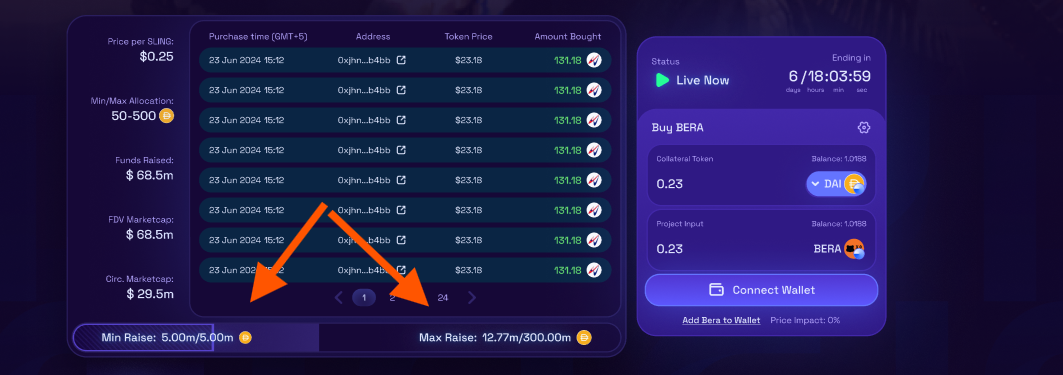
### Where to view the Min and Max Raise Info
If a creator has set a minimum and maximum raise amount, this info is provided in the 'sale info' tab outlined below.
**What Happens if the Min or Max is Reached?**
* **If the Minimum Raise isn’t Met**: All contributions are refunded, meaning your funds are returned and the sale is considered unsuccessful.
* **If the Maximum Raise is Hit**: The sale ends immediately, and no further contributions are accepted. The project is considered fully funded, and participants will receive their token allocations.